Gesture to Input Mapping
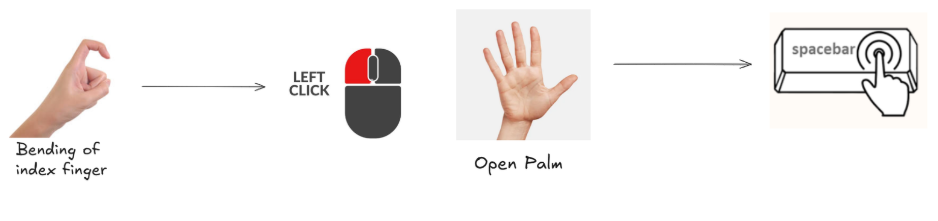
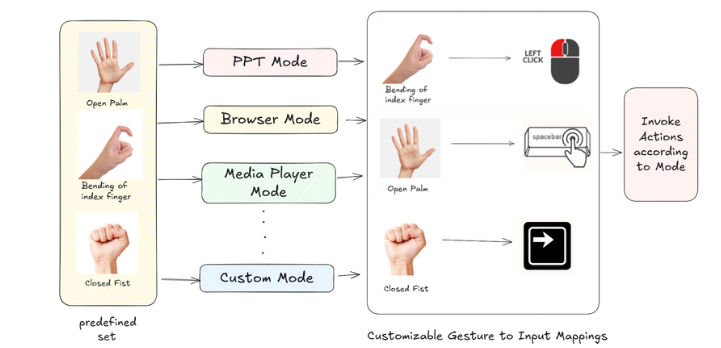
This section explains how recognized gestures are translated into OS/application inputs. The mapping layer connects gesture outputs from the engine to actions like key presses, mouse control, and volume changes.
Architecture at a glance
- Detection: Models produce static/dynamic gestures and confidence on each
region(hand). - Routing: The engine publishes events via
event_busand forwards eachregionto theApplicationModeManager. - Mapping: The active mode (browser, media, PPT, game, etc.) defines which gestures trigger which actions.
- Execution: Actions run using platform helpers (keyboard/mouse), optional
GameController, orVolumeController.
Where the mapping happens (code)
application_modes.py— ApplicationModeManagerprocess_application_modes(region): readsregion.gesture_name,region.gesture_type, and confidence, then triggers mode-specific actions.- Lazily initializes a
GameControllerwhen game mode is enabled.
volume_controller.py— system volume control (falls back gracefully if pycaw is unavailable).event_system.py—EventBusfor cross-component notifications (e.g.,gesture_detected).
Gesture sources
- MediaPipe-style static gestures:
region.gesture_name(e.g., "Open Palm", "Fist", "Peace"). - Dynamic gestures (custom):
region.gesture_type(e.g., index-only, parallel/perpendicular fingers), computed from landmarks. - Confidence:
region.gesture_confidenceis used to filter noisy detections.
Execution flow
- Engine obtains processed
regionwith landmarks and gesture outputs. ApplicationModeManager.process_application_modes(region)reads active mode and evaluates configured gestures.- Matching gestures dispatch to helper(s): cursor/mouse, keyboard,
GameController,VolumeController. EventBuspublishes aGestureEventfor UI overlays, logging, or analytics.
Tips
- Keep per-mode mappings minimal and distinct to avoid conflicts.
- Use gesture confidence thresholds per action.
- Provide a quick on-screen indicator for executed actions to improve UX.