Custom Mode Builder
Define your own gestures-to-actions mapping without changing core code. The Custom Mode Builder lets you create a tailored mode and activate it from the GUI.
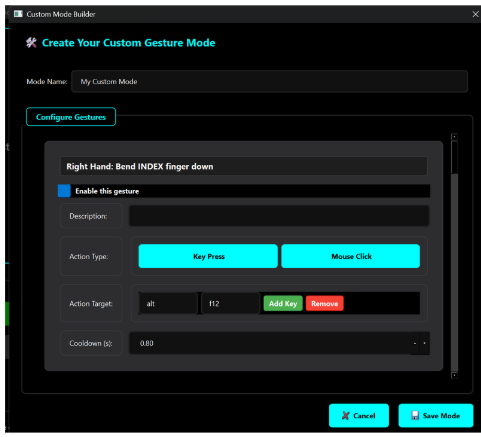
What you can configure
- Gesture → Action bindings (per hand)
- Confidence thresholds per gesture
- Cursor/scroll enablement and sensitivity
- Game/volume integration toggles
How it plugs into the system
- Configuration is loaded by
config_managerand exposed onself.params/self.app_modesfor the engine. ApplicationModeManagerreads the active mode (e.g.,custom_mode) and executes actions according to your bindings.- Use
event_busto observe executed actions or to feed UI indicators.
Typical workflow
- Open the Custom Mode Builder in the GUI.
- Select a base set of gestures (static from classifier or dynamic from landmark rules).
- Bind each gesture to an action (mouse/keyboard/volume/game).
- Save and activate your custom mode.
Tips
- Start from a simple set of non-conflicting gestures.
- Use per-gesture confidence thresholds and a short debounce to avoid accidental triggers.
- Keep a visual overlay to confirm the recognized gesture before execution.